22 KiB
RP2040 Emulation (Raspberry Pi Pico / Pico W)
Status: Functional · In-browser emulation · No backend dependencies Engine: rp2040js — ARM Cortex-M0+ emulator in TypeScript Platform: RP2040 @ 125 MHz — dual-core ARM Cortex-M0+ (single core emulated) Available on: all platforms (Windows, macOS, Linux, Docker) Applies to: Raspberry Pi Pico, Raspberry Pi Pico W
Table of Contents
- Overview
- Supported Boards
- Emulator Architecture
- Emulated Memory and Peripherals
- Full Flow: Compile and Run
- Binary Format and Loading
- GPIO
- UART — Serial Monitor
- ADC — Analog Inputs
- I2C Virtual Devices
- SPI
- PWM
- Simulation Execution Loop
- Pin Mapping
- Oscilloscope / Logic Analyzer
- Known Limitations
- Tests
- Differences vs Other Emulators
- Key Files
1. Overview
The Raspberry Pi Pico and Pico W boards use the RP2040 microcontroller — a dual-core ARM Cortex-M0+ chip designed by Raspberry Pi. Unlike the ESP32 (which requires QEMU running in the backend), RP2040 emulation runs entirely in the browser using the rp2040js library (a local clone in wokwi-libs/rp2040js/).
Emulation Engine Comparison
| Board | CPU | Engine |
|---|---|---|
| Arduino Uno / Nano / Mega | AVR ATmega | avr8js (browser) |
| Raspberry Pi Pico / Pico W | RP2040 ARM Cortex-M0+ | rp2040js (browser, no backend) |
| ESP32-C3, XIAO-C3 | RISC-V RV32IMC | RiscVCore.ts (browser) |
| ESP32, ESP32-S3 | Xtensa LX6/LX7 | QEMU lcgamboa (backend WebSocket) |
Advantages of the In-Browser Emulator
- No network dependencies — works offline, no WebSocket connection to any backend process
- Instant startup — emulation begins immediately after compilation (no process launch latency)
- Testable with Vitest — the same TypeScript code runs in both production and CI tests
- Cross-platform — identical behavior on Windows, macOS, Linux, and Docker
2. Supported Boards
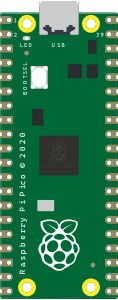 Raspberry Pi Pico |
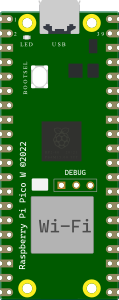 Raspberry Pi Pico W |
| Board | arduino-cli FQBN | Built-in LED | Notes |
|---|---|---|---|
| Raspberry Pi Pico | rp2040:rp2040:rpipico |
GPIO 25 | Standard Pico |
| Raspberry Pi Pico W | rp2040:rp2040:rpipicow |
GPIO 25 (via CYW43) | WiFi chip not emulated |
Pico W note: The wireless chip (Infineon CYW43439) is not emulated. GPIO 25 drives the on-board LED in the same way as the standard Pico for simulation purposes.
3. Emulator Architecture
Arduino Sketch (.ino)
        │
        ▼  arduino-cli (backend, FQBN rp2040:rp2040:rpipico)
  sketch.ino.bin  ←  raw ARM binary (no HEX format)
        │
        ▼  base64 → frontend
  compileBoardProgram(boardId, base64)
        │
        ▼  RP2040Simulator.loadBinary(base64)
  Uint8Array → copied into rp2040.flash at offset 0
        │
        ▼  rp2040.loadBootrom(bootromB1)
  Bootrom B1 revision loaded
        │
        ▼  PC reset to 0x10000000 (FLASH_START_ADDRESS)
  CortexM0Core.executeInstruction()  ←  requestAnimationFrame @ 60 FPS
        │                                2,083,333 cycles/frame (125 MHz ÷ 60)
        ├── GPIO listener → PinManager → visual component update
        ├── UART0/UART1 byte → onSerialData → Serial Monitor
        ├── ADC channel read → channelValues[ch] → analogRead()
        └── I2C bus events → virtual I2C device callbacks
Main Classes
| Class | File | Responsibility |
|---|---|---|
RP2040Simulator |
simulation/RP2040Simulator.ts |
Main wrapper: bootrom, GPIO, UART, ADC, I2C, SPI, RAF loop |
RP2040 |
rp2040js (library) |
Full hardware model: CPU, peripherals, memory map |
CortexM0Core |
rp2040js (library) |
ARM Cortex-M0+ instruction decoder and executor |
PinManager |
simulation/PinManager.ts |
Routes GPIO events to visual components |
4. Emulated Memory and Peripherals
Memory Map
| Region | Base Address | Size | Description |
|---|---|---|---|
| Flash (XIP) | 0x10000000 |
16 MB | Program storage (firmware binary) |
| SRAM | 0x20000000 |
264 KB | Data RAM (stack, variables) |
| USB DPRAM | 0x50100000 |
4 KB | USB dual-port RAM |
| Bootrom | 0x00000000 |
4 KB | B1 revision bootrom |
Peripherals Emulated by rp2040js
| Peripheral | Details |
|---|---|
| GPIO | All 30 pins (GPIO0–GPIO29), input/output |
| UART0 | TX/RX, baud rate auto-detection |
| UART1 | TX/RX, forwarded to same onSerialData callback |
| I2C0 | Master mode, virtual device callbacks |
| I2C1 | Master mode, virtual device callbacks |
| SPI0 | Default loopback; custom handler supported |
| SPI1 | Default loopback; custom handler supported |
| ADC | 5 channels (GPIO26–29 + internal temp sensor, ch4) |
| PWM | Available on any GPIO |
| Timers | Used internally for delay(), millis() |
| Watchdog | Present (reads return 0) |
| PLL / Clock | Simulated at fixed 125 MHz |
Peripherals NOT Emulated
- WiFi/BLE (Pico W: CYW43439 wireless chip)
- USB device stack (USB device enumeration)
- DMA transfers (DMA control registers return 0)
- PIO state machines (PIO registers return 0)
PIO in particular is a significant limitation —
PicoLED,WS2812(NeoPixel),DHT, and other timing-critical libraries that rely on PIO will not function.
5. Full Flow: Compile and Run
5.1 Compile the Sketch
The backend compiles for the Pico using the earlephilhower arduino-pico core:
# First-time setup — install the RP2040 board manager:
arduino-cli config add board_manager.additional_urls \
  https://github.com/earlephilhower/arduino-pico/releases/download/global/package_rp2040_index.json

arduino-cli core install rp2040:rp2040

# Compile for Raspberry Pi Pico:
arduino-cli compile \
  --fqbn rp2040:rp2040:rpipico \
  --output-dir build/ \
  my_sketch/

# Output: build/my_sketch.ino.bin  ← raw binary
The Velxio backend automatically finds sketch.ino.bin (or sketch.ino.uf2 as fallback), encodes it as base64, and sends it to the frontend in CompileResponse.binary_content.
5.2 Serial Redirection (Important)
The backend automatically prepends #define Serial Serial1 to sketch.ino for RP2040 boards:
# backend/app/services/arduino_cli.py
if "rp2040" in board_fqbn and write_name == "sketch.ino":
    content = "#define Serial Serial1\n" + content
Why? The RP2040 bootrom uses UART0 for its own communication. To avoid conflicts, the Arduino Serial object is remapped to UART1. This means Serial.print() in your sketch goes through UART1, which the emulator also captures and shows in the Serial Monitor.
5.3 Minimal Sketch for Raspberry Pi Pico
// Blink the built-in LED (GPIO 25)
void setup() {
  pinMode(LED_BUILTIN, OUTPUT);
  Serial.begin(115200);
  Serial.println("Pico started!");
}

void loop() {
  digitalWrite(LED_BUILTIN, HIGH);
  Serial.println("LED ON");
  delay(500);
  digitalWrite(LED_BUILTIN, LOW);
  Serial.println("LED OFF");
  delay(500);
}
5.4 Analog Read Example
// Read a potentiometer on GPIO 26 (ADC channel 0)
void setup() {
  Serial.begin(115200);
}

void loop() {
  int raw = analogRead(A0);       // GPIO26 → ADC ch0, returns 0–4095
  float voltage = raw * 3.3f / 4095.0f;
  Serial.print("ADC: ");
  Serial.print(raw);
  Serial.print(" → ");
  Serial.print(voltage);
  Serial.println(" V");
  delay(200);
}
6. Binary Format and Loading
The RP2040 uses a raw binary format (.bin), not the Intel HEX format used by AVR:
// RP2040Simulator.loadBinary(base64: string)
loadBinary(base64: string): void {
  const binary = Uint8Array.from(atob(base64), c => c.charCodeAt(0));
  // Copy directly into flash at offset 0
  this.rp2040.flash.set(binary, 0);
  // Load bootrom and reset PC to 0x10000000
  this.rp2040.loadBootrom(bootromB1);
}
Flash memory layout (as seen by the CPU):
0x10000000  ← FLASH_START_ADDRESS — firmware entry point (PC reset here)
0x10000100  ...  program .text section
0x10xxxxxx  ...  .rodata, .data, constants
0x20000000  ← SRAM — stack, heap, .bss
The bootrom B1 (rp2040-bootrom.ts) contains the RP2040's factory-programmed ROM code, required for correct flash XIP (eXecute In Place) initialization.
7. GPIO
All 30 GPIO pins (GPIO0–GPIO29) are emulated. Each pin has an event listener attached at startup:
// RP2040Simulator.ts — gpio listener setup
for (let gpioIdx = 0; gpioIdx < 30; gpioIdx++) {
  const gpio = this.rp2040.gpio[gpioIdx];
  gpio.addListener((state: GPIOPinState) => {
    const isHigh = state === GPIOPinState.High;
    this.pinManager.triggerPinChange(gpioIdx, isHigh);
    if (this.onPinChangeWithTime) {
      const timeMs = this.rp2040.clock.timeUs / 1000;
      this.onPinChangeWithTime(gpioIdx, isHigh, timeMs);
    }
  });
}
GPIO Input (Push Buttons / Switches)
External components can drive GPIO pins from the UI:
// Set a pin HIGH or LOW from the simulator canvas (e.g. button press)
simulator.setPinState(gpioPin: number, state: boolean): void
// → rp2040.gpio[gpioPin].setInputValue(state)
This is equivalent to the signal propagated by a physical wire from a button to the GPIO pin.
LED_BUILTIN
LED_BUILTIN= GPIO 25 on both Pico and Pico W- A pin change listener on GPIO 25 drives the on-board LED component
digitalWrite(LED_BUILTIN, HIGH)→ GPIO 25 goes high → LED visual component turns on
8. UART — Serial Monitor
The RP2040 has two UART controllers. Both are emulated and forwarded to the Serial Monitor:
| Channel | TX Pin | RX Pin | Arduino Object | Notes |
|---|---|---|---|---|
| UART0 | GPIO0 | GPIO1 | Serial1 |
Used by bootrom; Arduino Serial redirected away |
| UART1 | GPIO4 | GPIO5 | Serial (redirected) |
Receives Arduino Serial.print() |
Serial Output (TX → Monitor)
// Both UART0 and UART1 forward bytes to the same callback:
this.rp2040.uart[0].onByte = (value: number) => {
  this.onSerialData?.(String.fromCharCode(value));
};
this.rp2040.uart[1].onByte = (value: number) => {
  this.onSerialData?.(String.fromCharCode(value));
};
Serial Input (Monitor → Sketch)
// Feed text from the Serial Monitor input box into the sketch:
simulator.serialWrite("COMMAND\n");
// → bytes queued in rp2040.uart[0].feedByte(charCode)
// → sketch reads them via Serial.read() / Serial.readString()
9. ADC — Analog Inputs
The RP2040 has a 12-bit ADC (0–4095) with 5 channels:
| ADC Channel | GPIO Pin | Arduino Alias | Default Value | Notes |
|---|---|---|---|---|
| 0 | GPIO26 | A0 | 2048 (~1.65 V) | General purpose |
| 1 | GPIO27 | A1 | 2048 (~1.65 V) | General purpose |
| 2 | GPIO28 | A2 | 2048 (~1.65 V) | General purpose |
| 3 | GPIO29 | A3 | 2048 (~1.65 V) | General purpose |
| 4 | — (internal) | — | 876 (~27 °C) | Internal temperature sensor |
Injecting ADC Values from UI Components
When a potentiometer is wired to an ADC pin on the canvas, the simulator canvas reads the potentiometer's value and injects it:
// SimulatorCanvas — potentiometer input event
simulator.setADCValue(channel: number, value: number): void
// value range: 0–4095 (clamped automatically)
// → rp2040.adc.channelValues[channel] = value
analogRead(A0) in the sketch reads adc.channelValues[0] directly.
10. I2C Virtual Devices
The RP2040 emulator supports virtual I2C devices — software objects that respond to I2C bus transactions from the firmware:
export interface RP2040I2CDevice {
  address: number;     // 7-bit I2C address
  writeByte(value: number): boolean;  // return true = ACK
  readByte(): number;
  stop?(): void;
}
Default Virtual Devices (Auto-Registered)
Three virtual I2C devices are registered automatically when a Pico program is loaded:
| Device | Address | Bus | Description |
|---|---|---|---|
VirtualDS1307 |
0x68 | I2C0 | Real-time clock (DS1307 compatible) |
VirtualTempSensor |
0x48 | I2C0 | Temperature sensor (LM75 / TMP102 compatible) |
I2CMemoryDevice |
0x50 | I2C0 | 24C04 EEPROM (512 bytes) |
Default I2C0 Pins
| Signal | GPIO |
|---|---|
| SDA | GPIO4 |
| SCL | GPIO5 |
I2C Bus Event Flow
firmware: Wire.beginTransmission(0x68)
        │
        ▼  I2C master asserts START + address
  rp2040.i2c[0].onConnect(address=0x68)
        │
        ▼  device found in registry
  ds1307.writeByte(register_address)
        │
  Wire.requestFrom(0x68, 7)
        │
        ▼  7 read calls
  ds1307.readByte() × 7
        │
        ▼  I2C STOP
  ds1307.stop()
11. SPI
Both SPI buses implement a loopback by default — bytes transmitted by the master are immediately echoed back as received bytes:
// Default: loopback
this.rp2040.spi[0].onTransmit = (value: number) => {
  this.rp2040.spi[0].completeTransmit(value);
};
Default SPI0 Pins
| Signal | GPIO |
|---|---|
| MISO | GPIO16 |
| CS | GPIO17 |
| SCK | GPIO18 |
| MOSI | GPIO19 |
Custom SPI Handler
A custom handler can replace the loopback for simulating specific SPI peripherals (displays, sensors):
simulator.setSPIHandler(bus: 0 | 1, handler: (value: number) => number): void
// handler receives TX byte, returns RX byte
12. PWM
PWM is available on any GPIO pin through the RP2040's hardware PWM slices. The rp2040js library emulates the PWM peripheral registers, so analogWrite() and ledcWrite() work at the firmware level.
Visual PWM feedback (LED dimming) in the simulator canvas uses the onPwmChange callback from PinManager, which receives the duty cycle as a 0.0–1.0 float and sets el.style.opacity on the LED element.
13. Simulation Execution Loop
The simulation runs at 60 FPS using requestAnimationFrame. Each frame executes enough CPU cycles to match a 125 MHz clock:
F_CPU            = 125,000,000 Hz
CYCLE_NANOS      = 1e9 / F_CPU  = 8 ns/cycle
CYCLES_PER_FRAME = F_CPU / 60   = 2,083,333 cycles/frame
WFI Optimization
When the ARM core executes a WFI (Wait For Interrupt) instruction — which Arduino uses during delay() and sleep() — the loop skips ahead to the next pending timer alarm instead of executing millions of NOP-equivalent cycles:
while (cyclesDone < cyclesTarget) {
  if (core.waiting) {
    // CPU is sleeping — jump to next alarm
    const jump = clock.nanosToNextAlarm;
    if (jump <= 0) break;
    clock.tick(jump);
    cyclesDone += Math.ceil(jump / CYCLE_NANOS);
  } else {
    // Execute one ARM instruction
    const cycles = core.executeInstruction();
    clock.tick(cycles * CYCLE_NANOS);
    cyclesDone += cycles;
  }
}
This allows delay(1000) to complete in microseconds of real time instead of simulating all 125 million cycles.
Variable Speed
The simulation speed can be adjusted:
simulator.setSpeed(speed: number): void
// speed: 0.1 (10% = very slow, for debugging) to 10.0 (10× faster)
14. Pin Mapping
The Pico has 40 physical pins. Below is the mapping from board pin names to GPIO numbers:
| Board Pin | GPIO | Function | Board Pin | GPIO | Function |
|---|---|---|---|---|---|
| GP0 | 0 | UART0 TX | GP15 | 15 | SPI1 TX |
| GP1 | 1 | UART0 RX | GP16 | 16 | SPI0 MISO |
| GP2 | 2 | I2C1 SDA | GP17 | 17 | SPI0 CS |
| GP3 | 3 | I2C1 SCL | GP18 | 18 | SPI0 SCK |
| GP4 | 4 | I2C0 SDA | GP19 | 19 | SPI0 MOSI |
| GP5 | 5 | I2C0 SCL | GP20 | 20 | — |
| GP6 | 6 | SPI0 SCK | GP21 | 21 | — |
| GP7 | 7 | SPI0 TX | GP22 | 22 | — |
| GP8 | 8 | UART1 TX | GP26 | 26 | ADC ch0 (A0) |
| GP9 | 9 | UART1 RX | GP27 | 27 | ADC ch1 (A1) |
| GP10 | 10 | SPI1 SCK | GP28 | 28 | ADC ch2 (A2) |
| GP11 | 11 | SPI1 TX | GP29 | 29 | ADC ch3 (A3) |
| GP12 | 12 | SPI1 RX | GP25 | 25 | LED_BUILTIN |
| GP13 | 13 | SPI1 CS | — | — | VBUS, VSYS, 3V3, GND |
| GP14 | 14 | SPI1 SCK | — | — | RUN, ADC_VREF |
All GPIO pins support PWM. GPIO 0–22 and 26–29 are available for general-purpose digital I/O. GPIO 23–25 are internal (power control, LED, SMPS mode).
15. Oscilloscope / Logic Analyzer
The RP2040 emulator provides timestamps for every GPIO transition using the internal simulation clock:
// Callback fires on every GPIO state change
simulator.onPinChangeWithTime = (pin: number, state: boolean, timeMs: number) => {
  // timeMs = rp2040.clock.timeUs / 1000
  // Accurate to ~8 ns (one ARM clock cycle)
};
The oscilloscope store (useOscilloscopeStore) subscribes to this callback and records samples:
GPIO event fired (pin=25, state=HIGH, timeMs=123.456)
        │
        ▼
useOscilloscopeStore.pushSample(channelId, 123.456, true)
        │
        ▼
Oscilloscope waveform display updates
This enables the built-in logic analyzer to display accurate waveforms for signals like PWM, UART bit patterns, and I2C clock/data.
16. Known Limitations
| Limitation | Detail |
|---|---|
| Single-core only | RP2040 is dual-core; emulator runs core 0 only. Code that uses multicore_launch_core1() will not execute on core 1 |
| No PIO | PIO state machines return 0. Libraries that depend on PIO (WS2812 NeoPixels, DHT sensors, I2S audio, quadrature encoders) will not work |
| No WiFi (Pico W) | The CYW43439 wireless chip is not emulated; WiFi.begin() will not connect |
| No USB device | USB HID, CDC, and MIDI device modes are not emulated |
| No DMA | DMA transfers return without moving data; memcpy-based alternatives work fine |
| No hardware FPU | ARM Cortex-M0+ has no floating-point unit; float operations are emulated in software (slower, but correct) |
| Timing accuracy | Emulation runs at variable speed; micros() and millis() track simulated time, not wall-clock time |
| Flash writes | LittleFS, EEPROM.commit(), and other flash-write operations may not persist across simulated resets |
| Serial redirect | Serial is mapped to Serial1 (UART1) at compile time; code that uses Serial1 directly alongside Serial may behave unexpectedly |
17. Tests
RP2040 emulation tests are in frontend/src/__tests__/:
cd frontend
npm test -- RP2040
Test Suites
| Suite | Tests | What It Verifies |
|---|---|---|
| Lifecycle | 4 | create, loadBinary, start, stop, reset idempotency |
| GPIO | 8 | All 30 pins, state injection, listener callbacks, multiple listeners |
| ADC | 3 | Channel access (0–4), value clamping to 0–4095, analogRead integration |
| Serial | 4 | onSerialData callback, serialWrite input feed, both UART channels |
| I2C | 5 | Virtual device registration, address matching, read/write/stop callbacks |
| SPI | 2 | Custom handler registration, loopback default |
| Bootrom | 1 | Loads without errors, PC resets to 0x10000000 |
18. Differences vs Other Emulators
| Aspect | Raspberry Pi Pico (RP2040) | Arduino AVR | ESP32-C3 (RISC-V) | ESP32 (Xtensa) |
|---|---|---|---|---|
| Engine | rp2040js (browser) |
avr8js (browser) |
RiscVCore.ts (browser) |
QEMU backend (WebSocket) |
| Backend dependency | No | No | No | Yes |
| Architecture | ARM Cortex-M0+ | AVR 8-bit | RISC-V RV32IMC | Xtensa LX6 |
| Clock speed | 125 MHz | 16 MHz | 160 MHz | 240 MHz |
| Binary format | .bin (raw) |
.hex (Intel HEX) |
.bin (merged flash) |
.bin (merged flash) |
| Arduino framework | Full | Full | Partial (no FreeRTOS) | Full |
| Serial | UART0 + UART1 | USART0 | UART0 | UART0 |
| ADC | 4 external + 1 temp | 6 channels (10-bit) | Not emulated | Emulated |
| I2C | 2 buses + virtual devices | Not emulated | Not emulated | Emulated |
| SPI | 2 buses (loopback) | Not emulated | Not emulated | Emulated |
| PIO | Not emulated | N/A | N/A | N/A |
| PWM | All GPIO pins | Timer-based | Not emulated | LEDC (mapped) |
| Oscilloscope support | Yes (8 ns resolution) | Yes | Yes | No |
| CI tests | Yes (Vitest) | Yes | Yes | No |
19. Key Files
| File | Description |
|---|---|
frontend/src/simulation/RP2040Simulator.ts |
Main emulator wrapper (GPIO, UART, ADC, I2C, SPI, RAF loop) |
frontend/src/simulation/rp2040-bootrom.ts |
RP2040 B1 bootrom binary (required for flash XIP) |
frontend/src/simulation/PinManager.ts |
Routes GPIO events to visual components on canvas |
frontend/src/store/useSimulatorStore.ts |
Zustand store — compileBoardProgram(), startBoard(), serial wiring |
frontend/src/components/simulator/SimulatorCanvas.tsx |
Canvas rendering, pin subscriptions, ADC/button event forwarding |
frontend/src/components/components-wokwi/PiPicoWElement.ts |
Pico W SVG board rendering and pin coordinate map |
frontend/src/__tests__/RP2040Simulator.test.ts |
Unit and integration tests |
backend/app/services/arduino_cli.py |
Compilation — detects RP2040 FQBN, encodes .bin as base64, prepends Serial1 redirect |
wokwi-libs/rp2040js/ |
Local clone of the rp2040js library (ARM Cortex-M0+ emulator) |