 c7e9c57b82
- Add docker-compose.prod.yml for standalone production deployment - Add nginx-host-velxio.conf for host nginx reverse proxy with SSL - Update deploy/nginx.conf with security headers, gzip, and health endpoint - Add deploy/nginx.prod.conf for production nginx configuration Co-Authored-By: Claude Opus 4.5 <noreply@anthropic.com> |
||
|---|---|---|
| .github | ||
| .vite/deps | ||
| backend | ||
| deploy | ||
| doc | ||
| frontend | ||
| scripts | ||
| wokwi-libs | ||
| .dockerignore | ||
| .gitignore | ||
| .gitmodules | ||
| CLAUDE.md | ||
| Dockerfile.standalone | ||
| README.md | ||
| docker-compose.prod.yml | ||
| docker-compose.yml | ||
| nginx-host-velxio.conf | ||
| package-lock.json | ||
| package.json | ||
| start-backend.bat | ||
| start-frontend.bat | ||
| update-wokwi-libs.bat | ||
README.md
Velxio - Arduino Emulator
A fully local, open-source Arduino emulator inspired by Wokwi. Write Arduino code, compile it, and simulate it with real AVR8 CPU emulation and 48+ interactive electronic components — all running in your browser.
Support This Project
If you find this project helpful, please consider giving it a star! Your support helps the project grow and motivates continued development.



Every star counts and helps make this project better! You can also support the project financially through GitHub Sponsors or PayPal -- any contribution helps keep the development going.
Screenshots

Raspberry Pi Pico simulation — ADC read test with two potentiometers, Serial Monitor showing live output, and compilation console at the bottom.

Arduino Uno driving an ILI9341 240×320 TFT display via SPI — rendering a real-time graphics demo using Adafruit_GFX + Adafruit_ILI9341.
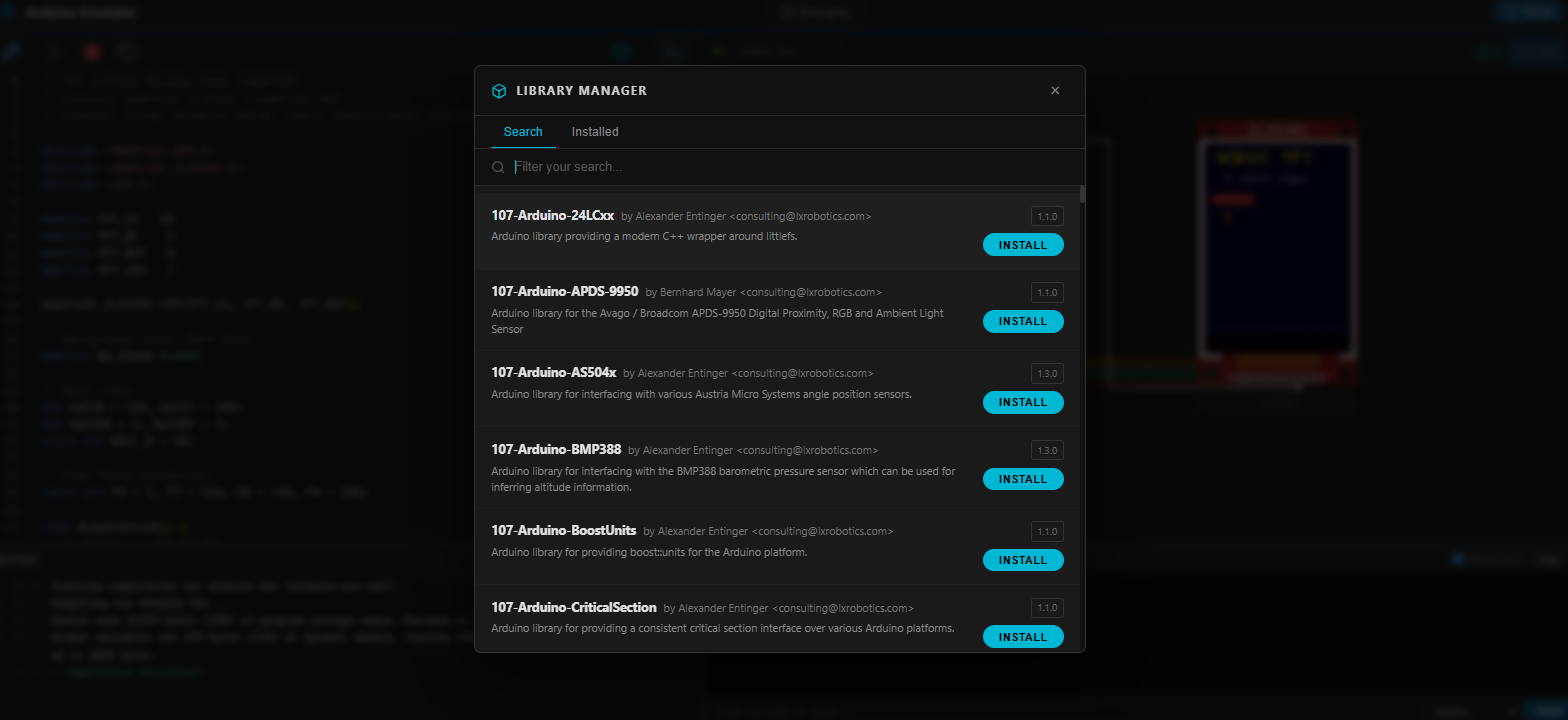
Library Manager loads the full Arduino library index on open — browse and install libraries without typing first.
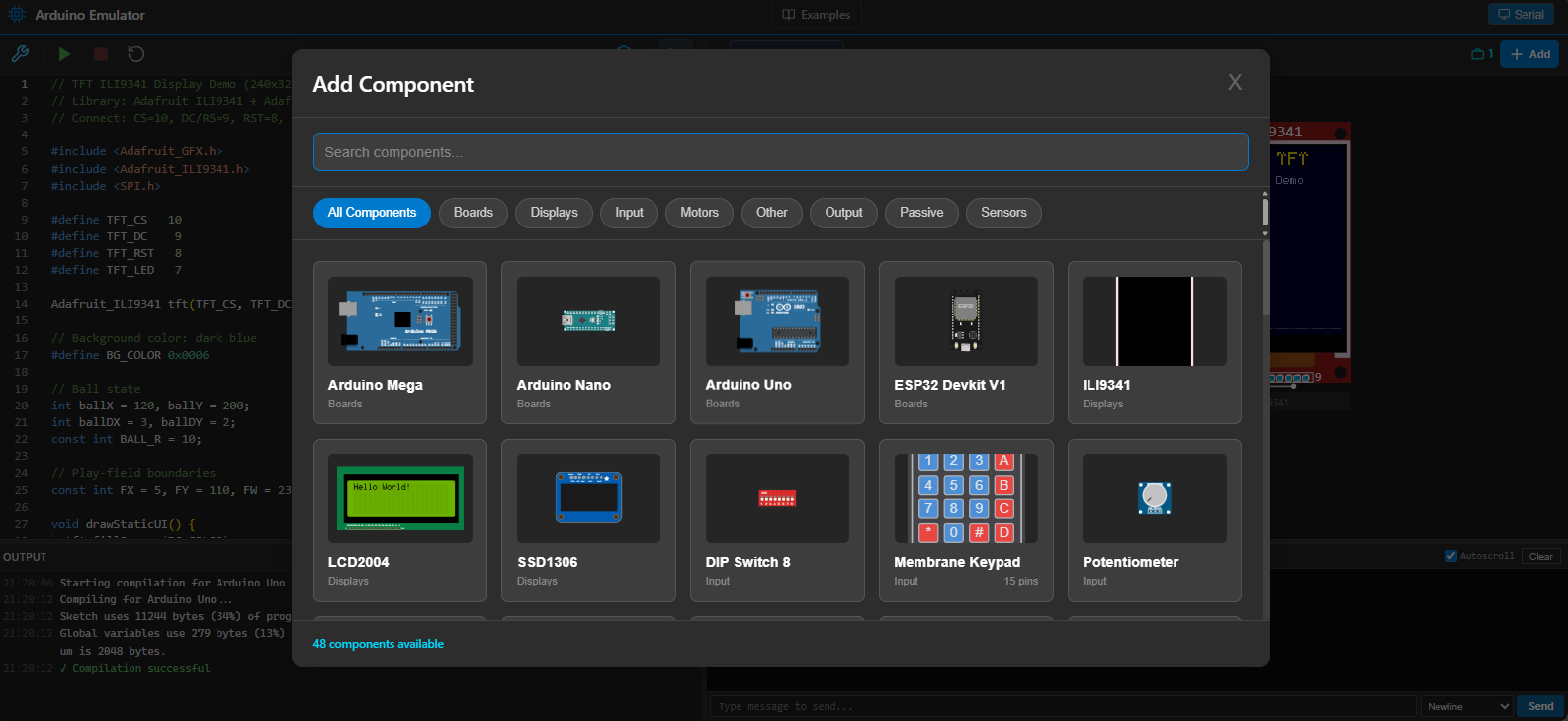
Component Picker showing 48 available components with visual previews, search, and category filters (Boards, Displays, Input, Motors, Output, Passive, Sensors).
Features
Code Editing
- Monaco Editor — Full C++ editor with syntax highlighting, autocomplete, minimap, and dark theme
- Arduino compilation via
arduino-clibackend — compile sketches to.hex/.uf2files - Compile / Run / Stop / Reset toolbar buttons with status messages
- Compilation console — resizable output panel at the bottom of the editor showing full compiler output, warnings, and errors
Multi-Board Support
- Arduino Uno (ATmega328p) — full AVR8 emulation via avr8js
- Raspberry Pi Pico (RP2040) — full RP2040 emulation via rp2040js, compiled with arduino-pico core
- Board selector in the toolbar — switch boards without restarting
AVR8 Simulation (Arduino Uno)
- Real ATmega328p emulation at 16 MHz using avr8js
- Intel HEX parser with checksum verification
- Full GPIO support — PORTB (pins 8-13), PORTC (A0-A5), PORTD (pins 0-7)
- Timer0/Timer1/Timer2 peripheral support (enables
millis(),delay(), PWM viaanalogWrite()) - USART (Serial) — full transmit and receive support
- ADC —
analogRead()on pins A0-A5, voltage injection from UI components - SPI — hardware SPI peripheral (enables ILI9341, SD card, etc.)
- I2C (TWI) — hardware I2C with virtual device bus (DS1307, temp sensor, EEPROM)
- ~60 FPS simulation loop with
requestAnimationFrame(~267k cycles/frame) - Speed control — adjustable from 0.1x to 10x
- PWM monitoring — reads OCR registers each frame to drive PWM-capable components
RP2040 Simulation (Raspberry Pi Pico)
- Real RP2040 emulation via rp2040js at 133 MHz
- UART0 serial output captured and displayed in Serial Monitor
- ADC — 12-bit, 3.3V reference on GPIO 26-29 (A0-A3)
- I2C bus with virtual device support
- Automatic
#define Serial Serial1injection at compile time to route serial output to emulated UART
Serial Monitor
- Live serial output — displays characters as the sketch sends them via
Serial.print() - Baud rate indicator — automatically detects the speed set by
Serial.begin()reading hardware registers in real time — no manual configuration needed - Send data to the Arduino RX pin from the UI
- Line ending selector — None, Newline, Carriage Return, or Both
- Autoscroll with toggle
- Resizable panel — drag the handle to adjust height
ILI9341 TFT Display Simulation
- Full SPI command decoding — CASET, PASET, RAMWR, SWRESET, DISPON, MADCTL, and more
- RGB-565 pixel rendering directly to an HTML Canvas element in real time
- 240×320 resolution with full framebuffer support
- Compatible with Adafruit_GFX + Adafruit_ILI9341 libraries
Component System (48+ Components)
- 48 electronic components auto-discovered from wokwi-elements source code
- Component picker modal with search bar, category filtering (Boards, Displays, Input, Motors, Output, Passive, Sensors), and live wokwi-element previews as thumbnails
- Dynamic component rendering from build-time metadata (TypeScript AST parser extracts
@customElementtags,@propertydecorators, and pin counts) - Drag-and-drop repositioning on the simulation canvas
- Component rotation in 90° increments
- Property dialog (single-click) — shows pin roles, Arduino pin assignment, rotate & delete actions
- Pin selector (double-click) — assign Arduino pins D0-D13 and A0-A5 to component pins
- Pin overlay system — clickable cyan dots on each component pin with hover animation
- Keyboard shortcuts — Delete/Backspace to remove, Escape to cancel
Part Simulation Behaviors
- LED — pin state drives LED on/off
- RGB LED — digital HIGH/LOW and PWM (
analogWrite) mapped to R/G/B channels - Pushbutton / 6mm pushbutton — press/release events inject active-LOW pin state
- Slide switch — toggle between HIGH and LOW
- DIP Switch 8 — 8 independent toggles, each driving its own pin
- Potentiometer — reads slider value (0-1023), converts to voltage (5V for AVR, 3.3V for RP2040), injects into ADC
- Slide potentiometer — same as rotary, with configurable min/max range
- Analog joystick — two ADC axes (VRX/VRY) + button press
- Photoresistor sensor — injects mid-range voltage on AO pin; reacts to element input events
- Servo — reads Timer1 OCR1A/ICR1 registers to calculate pulse width and maps to 0-180° angle
- Buzzer — Web Audio API tone generation, frequency derived from Timer2 OCR2A/TCCR2B registers
- LED Bar Graph — 10 individual LEDs driven by pins A1-A10
- 7-Segment Display — segments A-G + DP driven by individual pins
- LCD 1602 & LCD 2004 — full HD44780 controller emulation in 4-bit mode (RS, E, D4-D7 pins)
- ILI9341 TFT — full SPI display simulation (see above)
Wire System
- Wire creation — click a pin to start, click another pin to connect
- Real-time preview — dashed green wire with L-shaped orthogonal routing while creating
- Orthogonal wire rendering — no diagonal paths
- Segment-based wire editing — hover to highlight, drag segments perpendicular to their orientation
- 8 signal-type wire colors: Red (VCC), Black (GND), Blue (Analog), Green (Digital), Purple (PWM), Gold (I2C), Orange (SPI), Cyan (USART)
- Automatic overlap offset — parallel wires are offset symmetrically (6px spacing)
- Auto-update positions — wire endpoints recalculate when components move
- Grid snapping (20px grid)
Library Manager
- Loads full library index on open — no need to type first; shows spinner while fetching
- Live search with debounce — filter while typing (400ms delay)
- Install libraries directly from the UI via arduino-cli
- Installed tab — see all installed libraries with versions
- Cross-reference — installed libraries show "INSTALLED" badge in search results
Example Projects
- 8 built-in example projects with full code, components, and wire definitions:
| Example | Category | Difficulty |
|---|---|---|
| Blink LED | Basics | Beginner |
| Traffic Light | Basics | Beginner |
| Button Control | Basics | Beginner |
| Fade LED (PWM) | Basics | Beginner |
| Serial Hello World | Communication | Beginner |
| RGB LED Colors | Basics | Intermediate |
| Simon Says Game | Games | Advanced |
| LCD 20x4 Display | Displays | Intermediate |
- Examples gallery with category and difficulty filters
- One-click loading — loads code, components, and wires into the editor and simulator
UI / Layout
- Resizable panels — drag the vertical divider between editor and simulator
- Resizable bottom panels — Serial Monitor and compilation console share the same draggable handle; both start at the same height (200px)
- Compilation console at the bottom — output appears below the code editor, not between the toolbar and the code
- Serial Monitor opens automatically when simulation starts
Wokwi Libraries (Local Clones)
- wokwi-elements — 48+ electronic web components (Lit-based Web Components)
- avr8js — AVR8 CPU emulator
- rp2040js — RP2040 emulator
- Build-time metadata generation — TypeScript AST parser reads wokwi-elements source to generate component metadata automatically
Prerequisites
1. Node.js
- Version 18 or higher
- Download from: https://nodejs.org/
2. Python
- Version 3.12 or higher
- Download from: https://www.python.org/
3. Arduino CLI
Install arduino-cli on your system:
Windows (with Chocolatey):
choco install arduino-cli
Windows (manual):
- Download from: https://github.com/arduino/arduino-cli/releases
- Add to system PATH
Verify installation:
arduino-cli version
Initialize arduino-cli:
arduino-cli core update-index
arduino-cli core install arduino:avr
For Raspberry Pi Pico support:
arduino-cli core install rp2040:rp2040
Installation
Option A: Docker (Recommended)
The fastest way to get started. Requires only Docker and Docker Compose.
git clone https://github.com/davidmonterocrespo24/velxio.git
cd velxio
docker compose up --build
Once running:
- App: http://localhost:3000
- API: http://localhost:8001
- API Docs: http://localhost:8001/docs
The Docker setup automatically installs arduino-cli, the AVR core, builds the wokwi-libs, and serves everything -- no other prerequisites needed.
To stop:
docker compose down
Option B: Manual Setup
1. Clone the repository
git clone https://github.com/davidmonterocrespo24/velxio.git
cd velxio
2. Setup Backend
cd backend

# Create virtual environment
python -m venv venv

# Activate virtual environment (Windows)
venv\Scripts\activate

# Install dependencies
pip install -r requirements.txt
3. Setup Frontend
cd frontend

# Install dependencies
npm install
Running
Start Backend
cd backend
venv\Scripts\activate
uvicorn app.main:app --reload --port 8001
The backend will be available at:
- API: http://localhost:8001
- Documentation: http://localhost:8001/docs
Start Frontend
cd frontend
npm run dev
The frontend will be available at:
Usage
- Open http://localhost:5173 in your browser
- Select a board (Arduino Uno or Raspberry Pi Pico) from the toolbar
- Write Arduino code in the editor (a Blink example is loaded by default)
- Click Compile to compile the code via the backend
- Click Run to start simulation — the Serial Monitor opens automatically
- Watch LEDs, LCDs, TFT displays, and other components react in real time
- Click components to view properties or assign pin mappings
- Click pins to create wires connecting components
- Use the Library Manager to install Arduino libraries
- Browse Examples to load pre-built projects
Project Structure
velxio/
├── frontend/                       # React + Vite + TypeScript
│   ├── src/
│   │   ├── components/
│   │   │   ├── ComponentPickerModal.tsx  # Component search & picker
│   │   │   ├── DynamicComponent.tsx      # Generic wokwi component renderer
│   │   │   ├── editor/                   # Monaco Editor + toolbar + compilation console
│   │   │   └── simulator/               # Canvas, wires, pins, Serial Monitor, dialogs
│   │   ├── simulation/
│   │   │   ├── AVRSimulator.ts           # AVR8 CPU emulator wrapper
│   │   │   ├── RP2040Simulator.ts        # RP2040 emulator wrapper
│   │   │   ├── PinManager.ts             # Pin-to-component mapping + PWM
│   │   │   └── parts/                    # Part behaviors (LED, LCD, ILI9341, servo, buzzer...)
│   │   ├── store/                        # Zustand state management
│   │   ├── services/                     # API clients & ComponentRegistry
│   │   ├── types/                        # TypeScript types (wires, components, metadata)
│   │   ├── utils/                        # Hex parser, wire routing, pin calc
│   │   └── pages/                        # EditorPage, ExamplesPage
│   └── public/
│       └── components-metadata.json      # Auto-generated component metadata
│
├── backend/                        # FastAPI + Python
│   └── app/
│       ├── main.py                       # Entry point, CORS config
│       ├── api/routes/compile.py         # POST /api/compile
│       ├── api/routes/libraries.py       # Library search, install, list
│       └── services/arduino_cli.py       # arduino-cli subprocess wrapper
│
├── wokwi-libs/                     # Cloned Wokwi repositories
│   ├── wokwi-elements/                  # 48+ Web Components (Lit)
│   ├── avr8js/                           # AVR8 CPU Emulator
│   └── rp2040js/                         # RP2040 Emulator
│
├── scripts/
│   └── generate-component-metadata.ts    # AST parser for component discovery
│
├── doc/
│   ├── ARCHITECTURE.md                 # Detailed architecture documentation
│   ├── WOKWI_LIBS.md                   # Wokwi integration documentation
│   ├── img1.png                        # Screenshot: RP2040 + Serial Monitor
│   ├── img2.png                        # Screenshot: ILI9341 TFT simulation
│   ├── img3.png                        # Screenshot: Library Manager
│   └── img4.png                        # Screenshot: Component Picker
│
├── CLAUDE.md                       # AI assistant guidance
└── update-wokwi-libs.bat           # Update local Wokwi libraries
Technologies Used
Frontend
- React 19 — UI framework
- Vite 7 — Build tool with local library aliases
- TypeScript 5.9 — Static typing
- Monaco Editor — Code editor (VS Code engine)
- Zustand 5 — State management
- React Router 7 — Client-side routing
Backend
- FastAPI — Python web framework
- uvicorn — ASGI server
- arduino-cli — Arduino compiler (subprocess)
Simulation & Components
- avr8js — Real AVR8 ATmega328p emulator (local clone)
- rp2040js — RP2040 emulator (local clone)
- wokwi-elements — 48+ electronic web components built with Lit (local clone)
Planned Features
- Project Persistence — Save/load projects with SQLite
- Undo/Redo — Edit history for code and circuit changes
- Wire Validation — Electrical validation and error highlighting
- Export/Import — Share projects as files
- More boards — ESP32, Arduino Mega, Arduino Nano
Update Wokwi Libraries
This project uses official Wokwi repositories cloned locally. To get the latest updates:
# Run update script
update-wokwi-libs.bat
Or manually:
cd wokwi-libs/wokwi-elements
git pull origin main
npm install
npm run build
See WOKWI_LIBS.md for more details about Wokwi integration.
Troubleshooting
Error: "arduino-cli: command not found"
- Make sure arduino-cli is installed and in PATH
- Verify with:
arduino-cli version
Error: "arduino:avr core not found"
- Run:
arduino-cli core install arduino:avr
Frontend doesn't connect to backend
- Verify backend is running at http://localhost:8001
- Check CORS logs in browser console
Compilation errors
- Check the compilation console output at the bottom of the editor
- Make sure Arduino code is valid
- Verify you have the correct core installed (
arduino:avrfor Uno,rp2040:rp2040for Pico)
LED doesn't blink
- Check port listeners are firing (browser console logs)
- Verify pin mapping in the component property dialog
CPU stuck at PC=0
- Ensure
avrInstruction()is being called in the execution loop - Check hex file was loaded correctly
Serial Monitor shows nothing
- Make sure your sketch calls
Serial.begin()beforeSerial.print() - Check the baud rate indicator appears in the Serial Monitor header after the simulation starts
Contributing
This is an open-source project. Suggestions, bug reports, and pull requests are welcome!
License
MIT
References
- Wokwi — Project inspiration
- avr8js — AVR8 emulator
- wokwi-elements — Electronic web components
- rp2040js — RP2040 emulator
- arduino-cli — Arduino compiler
- Monaco Editor — Code editor